
Hello everyone! In my previous article, “Defender for Office 365: The A.I. Response and the Human Element,” we explored how email protection operates within the Microsoft Defender XDR platform. We looked at how Microsoft Defender for Office 365 processes incoming messages, identifies malicious content, and even uses features like Zero-Hour Auto Purge to help protect organizations from threats like Business Email Compromise (BEC).
But every good story has a sequel (most of the time).
In the first chapter, we focused on defending the front gate — the inbox — where many attacks attempt their initial entry. But as any good superhero movie reminds us, when the villain slips past the first line of defense, the story isn’t over. In fact, that’s often when the real battle begins. What the attacker may think is a successful entry can quickly turn into an encounter with the backup team waiting behind the scenes: Microsoft Defender XDR.
One of the key defenders in that lineup is Microsoft Defender for Endpoint, which shifts the fight from the inbox to the device itself. Once an attacker attempts to execute code, establish persistence, or move laterally, Defender for Endpoint begins collecting telemetry and analyzing behavior to detect and contain the threat.
Sometimes the threat slips through email filtering and lands directly on the endpoint. When that happens, the fight moves from the inbox to the device itself. This is where attackers attempt to execute payloads, establish persistence, harvest credentials, and move laterally through the environment.
Moments like this highlight why defense in depth is such a critical concept in modern security architecture. No single control can stop every attack, which is why layered defenses are necessary. Within Microsoft Defender XDR, multiple protective layers work together to detect, correlate, and respond to threats across email, endpoints, identities, and cloud applications.
At the device layer, Microsoft Defender for Endpoint becomes a key player. By continuously collecting telemetry and analyzing device behavior, Defender for Endpoint helps security teams detect suspicious activity, investigate incidents, and contain threats before they can spread further through the environment. This is critical to stop lateral movement type attacks and stopping serious issues Ransomware from spread by use of isolation or containment (more on these later in the article).
And that’s where our next hero enters the scene.
Enter Microsoft Defender for Endpoint.
If Defender for Office 365 protects the city gates, Defender for Endpoint protects the streets inside the city. It continuously monitors device activity, collects telemetry, and feeds those signals into Microsoft Defender XDR, where alerts are correlated and incidents are investigated.
So, consider this article the sequel to our previous adventure. In this chapter, we’re shifting the spotlight from the inbox to the endpoint and exploring how Defender for Endpoint detects threats, investigates suspicious activity, and helps security teams contain attacks before they can spread.
So, grab your cape (and snacks), because the sequel starts now!!!
Defender for Endpoint
Microsoft Defender for Endpoint is Microsoft’s enterprise endpoint detection and response (EDR) platform designed to help organizations prevent, detect, investigate, and respond to advanced threats on devices. It continuously collects telemetry from endpoints—including processes, file activity, network connections, registry changes, and user actions—and sends that data to the Microsoft security cloud for analysis.
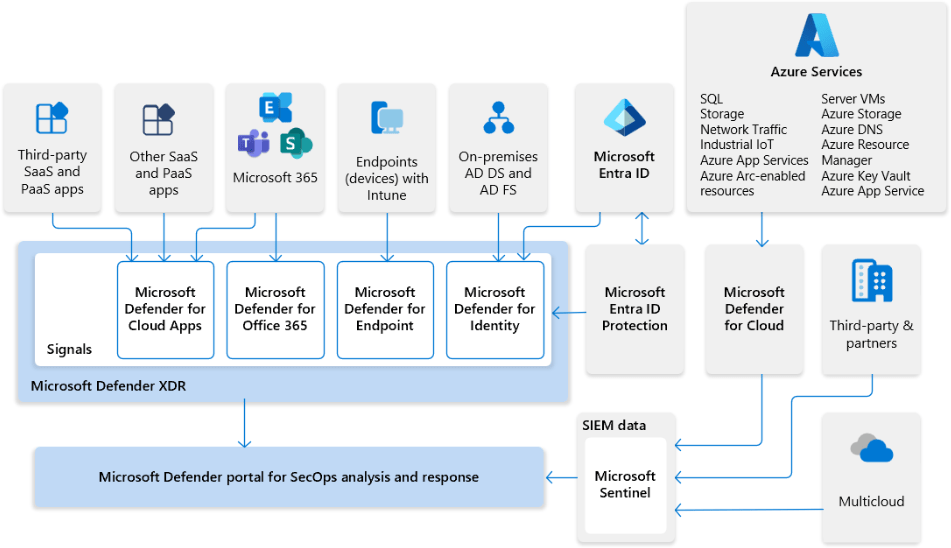
Within the broader ecosystem of Microsoft Defender XDR, Defender for Endpoint acts as a critical sensor at the device layer. Signals generated from endpoints are correlated with activity from email, identity, and cloud applications to create a unified incident view. This allows security teams to see the entire attack chain—from initial access to lateral movement—and respond more effectively.
Like any good superhero team, Defender for Endpoint doesn’t rely on just one power. Instead, it brings together several layers of protection.
- Next-generation antivirus
- Endpoint detection and response (EDR)
- Behavioral and machine learning detections
- Automated investigation and remediation
- Threat intelligence integration
- Advanced threat hunting capabilities
Together, these capabilities help organizations reduce the time between threat detection and containment, enabling security teams to quickly identify and stop attacks before they spread throughout the environment.
The diagram below shows the many moving pieces of Defender XDR, Defender for Endpoint is just one part of the team.
Licensing & Features for Defender for Endpoint
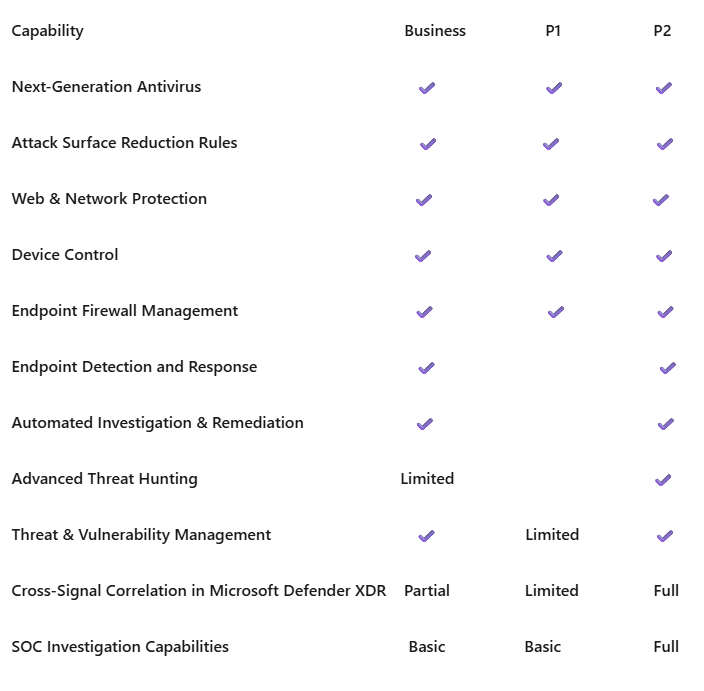
There are feature and functionality differences between the Defender for Endpoint plans. I have included some information below about P1 vs P2. This article is written from the lens of a P2 organization or user. I want to also make mention that Defender for Endpoint is compatible with macOS, Linux (Limited Distributions & Kernel support), iOS, and Android. Defender for Endpoint can also be used to protection your Windows Servers environment (Licensing is not included in end-user licensing)
If Defender for Office 365 protects the inbox and Defender for Endpoint protects the device, then Microsoft Defender XDR is where the heroes assemble. By bringing together signals from across the environment, it reveals the full story of an attack and allows defenders to respond as a unified team.
Now that we understand the team lineup and licensing options, it’s time to focus on one of the key defenders. Let’s take a closer look at Microsoft Defender for Endpoint—its capabilities and how it steps into the fight when an attack reaches the device.
Defender for Endpoint Core Components
Before we dive into the attack scenario, it helps to understand some of the core components that make Defender for Endpoint such a powerful part of the Defender XDR platform.
Next-Generation Antivirus
The Next-Generation Antivirus (NGAV) engine provides traditional malware protection enhanced with modern detection techniques.
It uses:
- cloud-based threat intelligence
- behavioral analysis
- machine learning models
- signature detection
to identify and block malicious files before or during execution.
This layer protects endpoints from common threats such as malware, trojans, ransomware, and malicious scripts. Scan behavior is dictated in this policy as is the response on low, medium, high, and critical events.
In terms of best practices, it is recommended if you are using Defender Anti-Virus that you run daily quick scans opposed to full scans. One of the main reasons is that when you are on a laptop and you remove it from a dock or network, a full scan will be cancelled. This may leave you scratching your head seeing weekly missed scans. The best practice recommendation is to run a full scan when onboarding and then if there is a potential incident with malware, ransomware, etc.
Endpoint Detection and Response
EDR provides deep visibility into endpoint activity by collecting telemetry such as:
- process creation
- file activity
- registry changes
- network connections
- authentication activity
This data allows Defender to detect suspicious behavior and generate alerts. Security teams can then investigate incidents using device timelines, process trees, and forensic artifacts.
Attack Surface Reduction (ASR)
Attack Surface Reduction rules help prevent common attack techniques used by malware and threat actors.
These rules can block risky behaviors such as:
- Office applications launching child processes
- executable content created by Office macros
- credential theft tools
- suspicious PowerShell activity
ASR focuses on blocking attack techniques rather than specific malware signatures, which helps stop previously unseen threats. *I want to say to exercise caution when configuring or evaluating attack surface reduction. You could end up blocking critical apps or processes.
In real deployments, it’s usually best to start ASR rules in audit mode before enforcing them. This helps you identify applications that might break before fully blocking the behavior.
Web Content Filtering
Web Content Filtering allows organizations to control and monitor access to specific categories of websites.
Administrators can block or audit categories such as:
- malicious sites
- phishing domains
- gambling sites
- social media platforms
In many environments, simply blocking access to these categories removes a large portion of user-driven risk. This is a really cool feature of Defender for Endpoint, it works best with Microsoft Edge, however, Web content filtering will work with Chrome, Firefox, Opera, and Brave browsers.
Under the hood, Smart Screen is responsible for protection while using Microsoft Edge. Network protection from your Anti-Virus policy does the protecting with the third-party browsers mentioned. It’s also worth mentioning that if you are using Defender for Endpoint in passive mode, Web content filtering is still available in Edge only.
Network Protection
Network Protection extends Defender’s protection to web traffic and network connections.
It blocks connections to:
- known malicious domains
- phishing infrastructure
- command-and-control servers
In other words, even if malware lands on the device, it may never reach its command-and-control-server. This is where isolation and containment can effectely cut communication.
This is a necessary feature for multiple reasons. Network protection covers not only phishing type websites via integration with Defender for Office 365, but it also protects third party browsers for web content filtering. It should be known that network protection cannot be used if Defender is in a passive state. Defender for Endpoint must be active.
Device Control
Device Control allows organizations to manage how removable storage devices interact with endpoints.
Examples include:
- blocking unauthorized USB drives
- allowing read-only access to removable storage
- controlling external media usage
This capability helps prevent data exfiltration and the introduction of malware via removable devices. This functionality operates similarly to how administrators may have previously used Group Policy (GPO) to restrict USB storage devices, but it is managed centrally through Microsoft Defender for Endpoint.
Policies can be deployed and monitored through the Defender security portal or integrated management tools such as Microsoft Intune, providing greater visibility and centralized control over removable media usage across the environment.
By combining device restrictions with telemetry and alerting, Defender for Endpoint enables organizations not only to block risky devices but also to monitor device usage and respond to suspicious activity.
Threat and Vulnerability Management (TVM)
Threat and Vulnerability Management (TVM) provides continuous assessment of an organization’s endpoint security posture. It helps security teams identify weaknesses across devices and prioritize remediation efforts based on real-world risk.
TVM analyzes endpoints to identify issues such as:
- missing operating system patches
- vulnerable or outdated software
- configuration weaknesses that could increase attack exposure
Using built-in threat intelligence, Defender prioritizes remediation actions based on the likelihood of exploitation and potential impact, allowing security teams to focus on the most critical risks first.
TVM also provides valuable exposure and vulnerability insights, helping organizations better understand where their environment may be most at risk.
Similar to the concept of a security score, TVM evaluates risk levels and classifies findings using severity levels such as:
- Low
- Medium
- High
These scores can fluctuate over time as vulnerabilities are discovered, patched, or mitigated.
Additionally, device risk signals generated by Microsoft Defender for Endpoint can be integrated with Microsoft Intune device compliance policies. This allows organizations to incorporate device risk scoring into authentication and conditional access decisions, helping ensure that only secure and compliant devices are allowed to access organizational resources.
Automated Investigation and Remediation (Automation)
Automated Investigation and Remediation (AIR) helps security teams respond to threats more quickly by automatically analyzing alerts and taking corrective action when malicious activity is confirmed.
Using built-in automation and AI-driven analysis, Defender evaluates alerts, gathers related evidence, and determines whether artifacts such as files, processes, or registry entries are malicious or benign.
During an automated investigation, Defender can take remediation actions such as:
- quarantining malicious files
- terminating suspicious or malicious processes
- removing persistence mechanisms (such as registry run keys or scheduled tasks)
- isolating compromised devices from the network
These actions are driven by behavioral signals and threat intelligence collected from endpoint telemetry.
By automating parts of the investigation and response process, AIR helps reduce the workload on security teams, speeds up containment, and minimizes the time between detection and remediation.
Within Microsoft Defender XDR, these automated investigations also contribute to incident correlation, helping security teams understand the broader attack story across endpoints, email, identities, and cloud applications.
Advanced Hunting (Enterprise)
Advanced Hunting enables security analysts to search Defender telemetry across the environment using Kusto Query Language (KQL).
This capability allows analysts to proactively investigate suspicious activity by querying large volumes of security signals collected from endpoints and other Microsoft Defender services.
With Advanced Hunting, analysts can query telemetry related to:
- device processes
- file activity
- network connections
- authentication events
- registry changes and system modifications
By analyzing this data, security teams can uncover suspicious patterns or attacker techniques that may not yet have triggered automated alerts.
KQL is often considered the “secret sauce” behind Advanced Hunting because it allows defenders to build powerful queries that identify attacker behavior across devices and workloads.
Security teams can also extend these capabilities by using the Microsoft Graph to automate queries, create custom detections, and generate alerts based on specific patterns discovered during investigations.
Additionally, Defender provides a guided hunting experience within the security portal. This includes built-in query templates and suggested investigations that help analysts quickly explore common attack techniques. Depending on licensing and Defender capabilities enabled in the tenant, organizations can also create and run custom queries and detection rules tailored to their specific security needs.
Together, these capabilities enable security teams to move beyond reactive alert handling and adopt a more proactive threat hunting approach within the Defender ecosystem.
Advanced Hunting (Business Tier)
While Microsoft Defender for Business includes many enterprise-grade endpoint protection features, its Advanced Hunting capabilities are more limited than those available in Microsoft Defender for Endpoint Plan 2 within Microsoft Defender XDR.
Advanced Hunting in Defender for Business is designed to provide visibility and investigation capabilities for smaller organizations, but it does not offer the same depth of customization or automation available in enterprise environments.
Key Limitations
1. Limited Custom Detection Creation Organizations using Defender for Business have fewer options for creating fully customized detection rules based on hunting queries compared to Defender for Endpoint Plan 2.
2. Reduced Automation Integration While security teams can run queries manually using Kusto Query Language, the ability to integrate those queries into automated detection pipelines is more restricted.
3. Less Extensive Cross-Workload Hunting Enterprise environments using Microsoft Defender XDR can perform hunting across multiple security workloads such as:
- endpoints
- identities
- cloud applications
Defender for Business primarily focuses on endpoint telemetry, which limits cross-domain hunting capabilities.
4. Smaller Data Scope Advanced hunting queries in Defender for Business typically operate on a smaller dataset compared to enterprise tenants that aggregate telemetry from multiple Defender services.
5. Fewer Built-In Hunting Experiences Enterprise Defender environments often include a broader set of pre-built hunting queries, investigation templates, and threat analytics capabilities.
For small and mid-sized organizations, Defender for Business still provides valuable visibility into endpoint activity and allows analysts to investigate suspicious behavior using KQL queries.
However, organizations with dedicated Security Operations Centers (SOC) or more complex environments may benefit from the expanded hunting capabilities available in Defender for Endpoint Plan 2 and the broader Defender XDR platform.
Endpoint Deception
Endpoint Deception introduces decoy assets designed to detect attackers during activities such as lateral movement or credential theft attempts. These deceptive artifacts are placed on endpoints to lure attackers into interacting with resources that legitimate users would normally never access.
Examples of deception artifacts include:
- fake credentials
- decoy network shares
- honeytokens
If an attacker attempts to use or access one of these deceptive resources, Microsoft Defender for Endpoint generates an alert indicating potential malicious activity. Because legitimate users should not interact with these artifacts, these alerts often provide high-confidence signals of attacker behavior.
This approach functions similarly to a honeypot mechanism, acting as both a lure and an early warning system that can reveal attacker activity before significant damage occurs.
It’s important to note that Endpoint Deception is currently available only in the full Defender for Endpoint Plan 2 (P2) licensing tier and is not included in Microsoft Defender for Business or Defender for Endpoint Plan 1.
Attack vs Defender Response Workflow
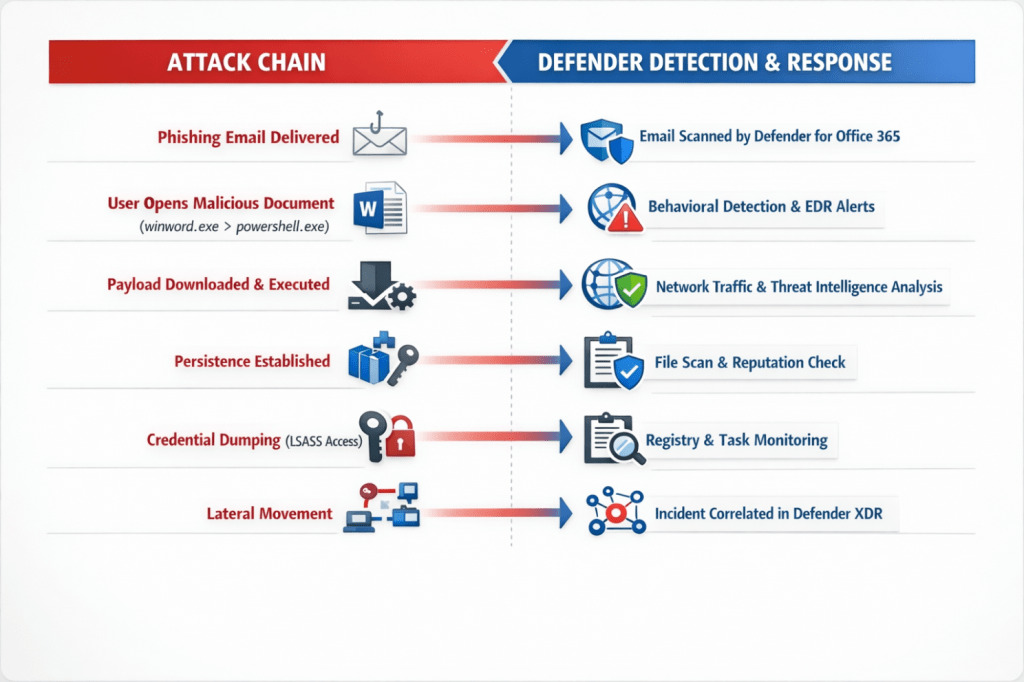
The diagram illustrates how an attacker’s actions progress through a typical attack chain while Microsoft Defender technologies detect and respond at each stage of the compromise

The attack often begins with a phishing email, which is first analyzed by Microsoft Defender for Office 365. If the message bypasses initial filtering and a user opens a malicious attachment, the activity shifts to the endpoint.
At that point, Microsoft Defender for Endpoint begins collecting telemetry and monitoring process activity. Suspicious behavior—such as Office spawning PowerShell, downloading payloads, or establishing persistence—can trigger behavioral detections and endpoint alerts.
As the attack progresses, Defender analyzes network traffic, file reputation, and system changes such as registry modifications or scheduled tasks. If an attacker attempts credential dumping or lateral movement, high-confidence alerts are generated through endpoint detection and response (EDR).
All of these signals are then correlated inside Microsoft Defender XDR, where related alerts are grouped into a single incident timeline. This allows security teams to see the complete attack story—from initial access to attempted compromise—and respond more quickly to contain the threat.
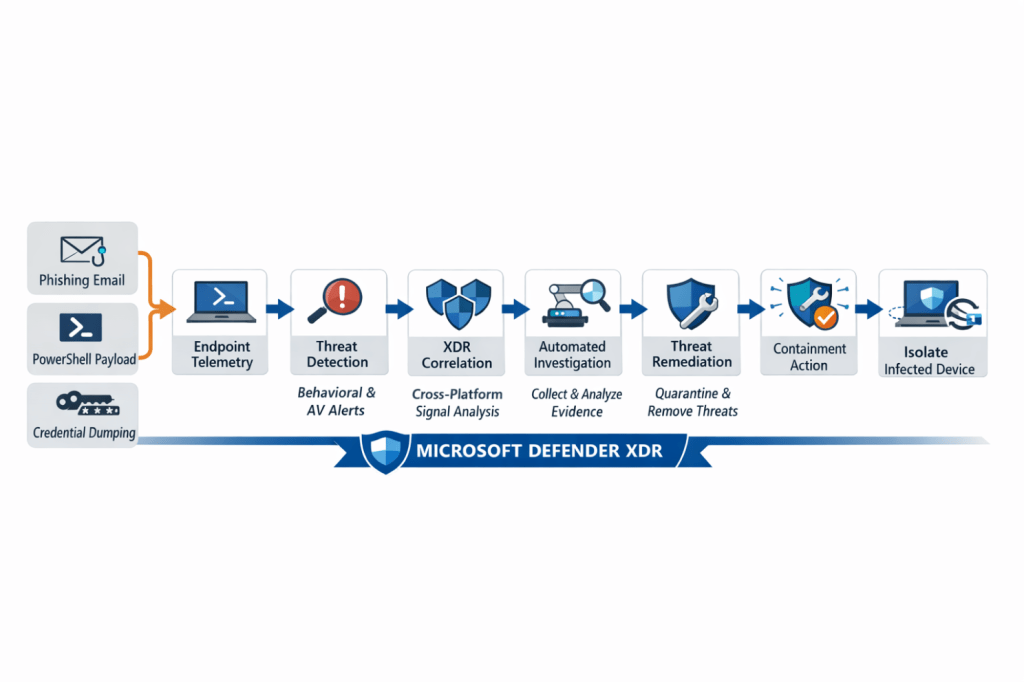
The attack often begins with a phishing email, which is first analyzed by Microsoft Defender for Office 365. If the message bypasses initial filtering and a user opens a malicious attachment, the activity shifts to the endpoint.
At that point, Microsoft Defender for Endpoint begins collecting telemetry and monitoring process activity. Suspicious behavior—such as Office spawning PowerShell, downloading payloads, or establishing persistence—can trigger behavioral detections and endpoint alerts.
As the attack progresses, Defender analyzes network traffic, file reputation, and system changes such as registry modifications or scheduled tasks. If an attacker attempts credential dumping or lateral movement, high-confidence alerts are generated through endpoint detection and response (EDR).
All of these signals are then correlated inside Microsoft Defender XDR, where related alerts are grouped into a single incident timeline. This allows security teams to see the complete attack story—from initial access to attempted compromise—and respond more quickly to contain the threat.
Remediation and the Human Element
Once suspicious activity is detected on an endpoint, Microsoft Defender for Endpoint begins analyzing telemetry and alerts generated during the attack. These signals are then correlated within Microsoft Defender XDR, allowing security teams to understand the full scope of the incident.
When malicious activity is confirmed, Defender can take several remediation actions to contain and remove the threat.
Malicious File Containment
If a payload is downloaded or executed on the device, Defender can immediately:
- quarantine the malicious file
- block the file hash across the environment
- prevent additional execution attempts
This stops the malware from continuing to run or spreading to other systems.
Process Termination
If the attack involves malicious scripts or suspicious processes such as PowerShell-based payloads, Defender can:
- terminate the running process
- block associated command-line activity
- prevent further execution attempts
This prevents the attacker from continuing their attack chain.
Persistence Removal
Many attackers attempt to establish persistence using registry run keys or scheduled tasks.
Defender can automatically remove:
- malicious registry entries
- unauthorized scheduled tasks
- startup persistence mechanisms
This ensures the threat does not return after remediation.
Device Isolation
If the endpoint shows signs of compromise or lateral movement, Defender can isolate the device from the network.
During isolation:
- the device can only communicate with Defender security services
- communication with other internal systems is blocked
This prevents attackers from spreading across the environment.
Credential Protection and Risk Mitigation
If suspicious credential access or LSASS interaction is detected, Defender alerts security teams to potential credential theft.
Security teams can then take additional actions such as:
- forcing password resets
- revoking authentication tokens
- applying conditional access restrictions
This reduces the risk of attackers using compromised credentials.
Incident Correlation and Investigation
All alerts generated during the attack are grouped into a single incident timeline inside Defender XDR.
Security teams can then:
- review the full attack chain
- investigate affected devices and users
- determine the scope of the compromise
This unified view allows defenders to respond quickly and understand how the attack unfolded.
Final Outcome
Through automated investigation, telemetry analysis, and coordinated response across the Defender platform, the attack is:
- detected early
- contained quickly
- remediated automatically or with SOC intervention
This layered response approach helps organizations reduce dwell time and prevent attackers from gaining deeper access to the environment.
As we’ve seen throughout this scenario, defending modern environments requires more than a single security tool—it requires a coordinated team. While Microsoft Defender for Endpoint monitors devices, detects suspicious behavior, and helps contain threats, those signals become even more powerful when they are correlated across the broader Microsoft Defender XDR platform.
This is where defenders gain the full story of an attack, from initial entry to attempted lateral movement. With the introduction of Microsoft Security Copilot, security teams now have an AI-powered assistant that can analyze incidents, summarize alerts, and help guide investigations using the same telemetry collected across the Defender ecosystem. In many ways, Security Copilot acts like the strategist behind the scenes—helping the defenders assemble the clues, understand the battlefield, and respond faster when threats appear. When these tools work together, organizations gain not just protection, but a coordinated defense where both AI and human expertise play a critical role in keeping the environment secure.
Thank you for taking the time out of your day to read my content, I appreciate you! Stay Vigilant Defenders!
 The Cloud Security Hub
Leave a comment