Defender for Office 365: The A.I. Response and the Human Element
Solution Architect – Microsoft Security
Derrick Ferrell
March 2, 2026
Hello everyone! I wanted to discuss how email protection operates within the Microsoft Defender XDR. I wanted to share how Defender for Office 365 processes email, how the Zero-Hour Auto Purge helps protect against Business Email compromise (BEC). So, sit back, grab a snack, and join me on this adventure!
This article will showcase some of the powerful features working behind the scenes to keep your organization protected. Before we move into the flow, I do want to call out there ARE differences between Defender for Office 365 Plan 1 and Plan 2. I have a quick reference below to show you a breakdown of feature and function availability.
Licensing Breakdown
Defender for Office 365 P1
- Anti-phishing protection and impersonation detection
- Anti-spam and anti-malware filtering
- Safe Links (time-of-click URL protection)
- Safe Attachments (sandbox analysis of files)
- Zero-Hour Auto Purge (ZAP) post-delivery remediation
- Preset security policies (Standard and Strict)
- Basic investigation visibility through Threat Explorer
- Real-time threat intelligence protection
Defender for Office 365 P2
- Anti-phishing protection and impersonation detection
- Anti-spam and anti-malware filtering
- Safe Links (time-of-click URL protection)
- Safe Attachments (sandbox analysis of files)
- Zero-Hour Auto Purge (ZAP) post-delivery remediation
- Preset security policies (Standard and Strict)
- Basic investigation visibility through Threat Explorer
- Real-time threat intelligence protection
- Automated Investigation and Response (AIR)
- Advanced Threat Explorer investigation tools
- Advanced Hunting using KQL queries
- Threat Analytics and campaign intelligence reporting
- Attack Simulation Training (phishing simulations)
- User risk awareness and training insights
- Campaign and attacker tracking views
- Deeper integration with Microsoft Defender XDR investigations
Defender for Office 365 has been around for bit, some of you may remember the product when it was affectionately referred to as Advanced Threat Protection (ATP). Let’s fast forward to now, Defender for Office 365, part of the Defender XDR suite!
A.I. for Mailbox Intelligence proves to be invaluable here due to the constant Microsoft Intelligence updates keeping the A.I. up to speed on Zero-day threats and known threats alike. Mailbox Intelligence learns communication patterns to identify anomalous behavior and contributes signals that can influence detection decisions and post-delivery remediation actions such as Zero-Hour Auto Purge.
How Defender for Office 365 Processes Email
Defender for Office 365 and Exchange Online do all the scanning and protection in this scenario. We will take a look at the flow in this section. While illustrated sequentially, these protections operate through parallel inspection engines that continuously reevaluate messages as intelligence evolves.
This is a summary of how the email is going flow.
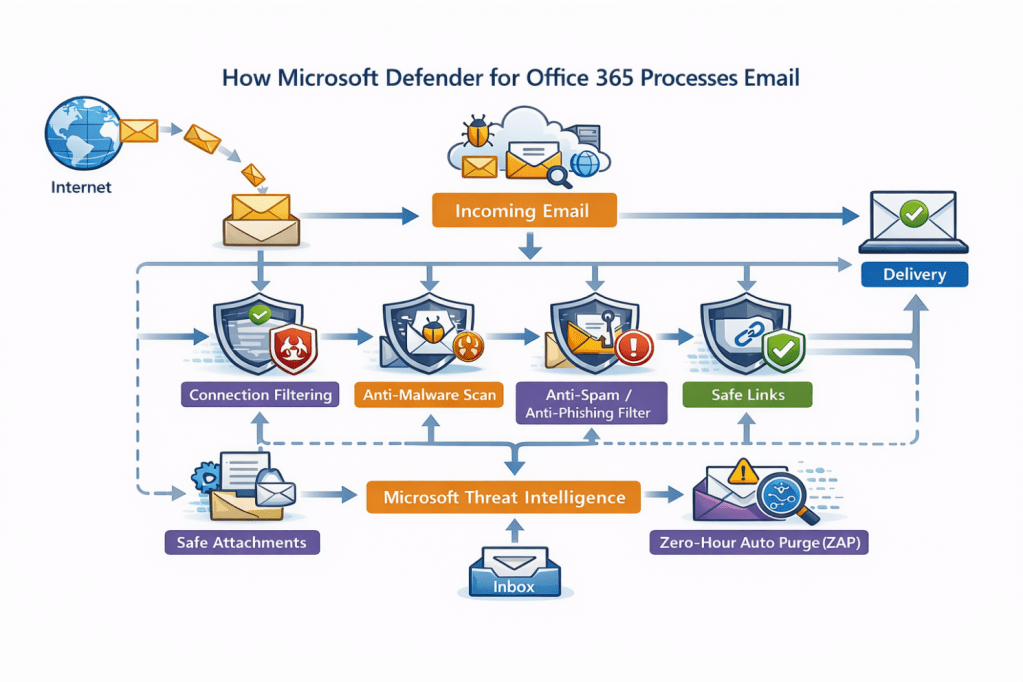

The email will be received by your domain via the Internet, from here the email starts to pass through filters and policies for scanning. The order of operations in which an email is scanned offers layers of filtering and protection driven by machine learning–driven detection.
Connection Filtering – Checks IP reputation, Block and Allow lists, SMTP behavior analysis, Authentication signals for sender legitimacy
↓
Anti-Malware Scanning – Scans email via file hash matching, signature detection, Heuristic analysis, reputation, and machine learning classification
↓
Anti-Spam – Analyzed by Sender Reputation, Message Characteristics, Authentication Checks, and Machine Learning Classification
Anti-Phishing Analysis – Anti-Phishing: Impersonation Detection, Mailbox Intelligence, Domain Analysis, URL & Content Analysis, Identity Aware Signals (XDR Integration)
↓
Safe Links – URLs are rewritten and evaluated at time-of-click using real-time reputation and behavioral analysis to prevent access to malicious websites
Safe Attachments – An attachment is scanned using Anti-Malware engines, reputation checks and machine learning. The file is then sent to a sandbox and opened inside a virtual isolated environment. The attachment is then analyzed for behavior based on what the file does to the system. The verdict is then assigned based on that outcome. The attachment is either blocked or delivered based on the policy and verdict.
↓
Delivery → Continuous Monitoring (ZAP) – Once an email is delivered, these emails continue to be scanned. If updated threat intelligence later classifies a delivered message as malicious, Zero-Hour Auto Purge automatically removes or quarantines the email.
Now that we know how email is flowing through Defender for Office 365, we see Defensive layers across the policies backed by Machine learning A.I. We will now take a look at how Defender for 365 integrations with Entra Identity and Zero-Hour Auto Purge help combat Business Email Compromise (BEC).
Business Email Compromise & The Zero-Hour Auto Purge
We are almost there! Let’s take a look at how Defender for Office 365 handles Business Email Compromise with Defensive layering.
Business Email Compromise (BEC) attacks succeed by abusing trusted identities, not by delivering malware. Attackers either impersonate users or compromise legitimate accounts and operate within normal business communication.
Because of this, modern protection must evaluate more than the email itself — it must evaluate the risk of the identity behind the message. In a previous article, I had written about vigilance around impersonation based on how Identity theft attempts are rampant.
Defender integrates with Entra Identity Protection to provide identity risk context across the Defender XDR ecosystem.
The BEC Attack Chain
The flow below is the typical BEC attack chain that Defender for Office 365 will disrupt using the layered defense approach.
Credential Theft – Identity Risk Signals may identify indicators of compromise, enabling automated or administrative remediation through identity protection policies.
↓
Account Compromise – If account is compromised, user risk and sign in risk scores will rise based on the potential compromise. Within a Zero Trust model, compromise is assumed until verified otherwise.
↓
Trusted Identity Abuse – The attacker chooses an account that garners organization trust. This is the prime target to make later movements, social engineer, and set up camp within your organization. This can also come in the form of trusted vendors or internal account takeover. This is where Entra Identity shines by detecting abnormal behavior such as impossible travel, Suspicious sign in, anonymous IP usage, etc.
↓
Fraudulent Request (payment/data) – Mailbox Intelligence and Anti-Phishing do the heavy lifting here. This is where the attackers try to catch you off guard with urgency or expedited requests. Impersonation protection and Mailbox Intelligence detect impersonation attempts, lookalike domains, and suspicious language patterns.
↓
Financial or data loss – A campaign against your organization can lead to financial and/or data loss. This is where Zero-Hour Auto Purge helps reduce exposure by automatically removing malicious emails once updated threat intelligence reclassifies the campaign.
The Defender for Office 365 Response
Based on this attack chain, this is how Defender for Office 365 and Entra Identity protection analyze and protection against this chain.
- Identity Risk Signals Detect Early Compromise based on a few factors – Impossible Travel Events, Anonymous or suspicious IP usage Leaked Credentials, Unusual Sign in Behavior, and Device or session anomalies. This may be familiar because other products such as Defender for Cloud apps also look at Identity and application interactions in a similar way with Anomaly detection policies.
- Identity context changes how Defender for Office 365 analyzes the user’s email and email trust evaluation. The Anti Phishing engines become more aggressive with analysis of the user and related emails. Emails from the compromised account are no longer automatically trusted.
- Mailbox Intelligence Detects Behavior Anomaly’s This looks internally and externally at the users in question by examining the relationship between sender and the recipient, communication frequency and interaction patterns are analyzed. This stands out and may stand out to a user; the attackers want to catch you off guard during a busy day or add urgent pressure to respond. Users must still practice caution in this area, if it is not expected then question the intent.
- XDR Correlation Strengthens Detection confidence this is a combination of email behavior, Identity Risk (Entra), Threat Intelligence (Defender for Office 365). This mix of analysis leads to stronger and more accurate detection by feeding this information to the A.I.
- Zero-Hour Auto Purge Enforces post-delivery protection This means that if the threat intelligence is updated and the email is now considered malicious. Defender for Office 365 updates the email verdicts and removes the email. The email is sent to quarantine for review. This will cause any attackers whose emails may have gained entry loss of persistence and access.
- Identity Signals Reduce Attacker Dwell Time this translates to faster detection times, automated remediation and cleanup.
The Human Element
Even with layered protection, identity signaling, and automated remediation like Zero-Hour Auto Purge, Business Email Compromise ultimately targets one thing: Human decision-making. Attackers do not need malware when they can manipulate trust, urgency, and normal business processes. Technology can detect risk and remove threats, but people still decide whether to approve payments, share information, or trust a message. This comes down to training to impact the user decision at this stage. Modern security therefore isn’t about removing humans from the process — it’s about augmenting them. Raising awareness in your organization to keep users sharp is recommended. This is where a feature like Attack Simulation can really help (P2 only).
Email campaigns and training will allow you to guide and train users on email interaction. In the scheme of things, Users must remain aware as well as IT administrators. IT administrators will augment themselves with this tool but will still need to investigate. BEC investigations traditionally require:
- Reviewing message headers Checking sign-in logs
- Correlating identity risk Validating campaign scope Determining user impact
As protections become more automated, the challenge shifts from detection to understanding and response at scale.
Scaling into Security Copilot
This can take time, effort, and personnel, but you are not without scalable options. This is where Security Copilot will come into the picture. Security Copilot acceleration will help the IT Administrator investigate faster; this is key because time is always a factor in an attack.
Some of the ways Security Copilot can help: Summarizing incidents automatically Correlating identity and email signals Explaining attacker behavior Generating investigation steps Producing remediation guidance.
This really cuts down on data gathering and allows you to get to the heart of the issue quickly.
It would look a little something like this:
Identity Signals detect risk
↓
Defender for Office 365 analyzes communication
↓
ZAP removes malicious emails
↓
Security Copilot explains and contextualizes events
↓
Humans make informed decisions faster
Microsoft Security Copilot’s Phishing Triage Agent helps security teams automatically analyze user-reported phishing emails, explain verdicts, and prioritize real threats within Defender XDR. More on that another time for now, I will leave you with some reference information.
As email threats continue to evolve, defending against attacks like Business Email Compromise requires more than blocking malicious messages — it requires continuously validating trust. Defender for Office 365, combined with identity signaling and Zero-Hour Auto Purge, demonstrates how modern XDR security shifts from static protection to ongoing risk evaluation across identities, communications, and behavior. Automation and AI-driven capabilities such as Security Copilot help security teams scale investigation and response, while user awareness and sound business processes remain essential safeguards. In the end, effective security is not achieved by technology alone, but by the collaboration between intelligent systems and informed people working together to reduce risk and respond with confidence.
Thank you for taking the time out of your day to read this, I appreciate you.
 The Cloud Security Hub
Leave a comment